Why DeepSeek's Prompt Cache Keeps Missing in Copilot Chat
If you've used DeepSeek V4 for Copilot Chat, you may have noticed something puzzling: the prompt cache hit rate sometimes drops from 99% to 37%, or even 13%, within a single conversation. The chat still works, but you're suddenly paying for tokens that should have been cached.
This post explains why this happens, which usage patterns trigger it, and what I've found digging through prompt dumps, API logs, and Copilot Chat's source code.
1. Background: Prompt Caching, and Why It's Fragile
What is Prompt Caching?
DeepSeek's API offers Context Caching, a disk-based prefix cache. If two consecutive requests share an identical prefix starting from token 0, the second request only pays for the new tokens; the cached prefix is served from disk at near-zero cost.
It's a simple rule: exact byte-for-byte prefix match from the very first token. One byte different anywhere in the prefix, and everything after that position is a cache miss.
The Inherent Tension
DeepSeek V4 for Copilot Chat is a VS Code extension that implements the LanguageModelChatProvider API. On each turn, Copilot Chat hands us:
- The full
messagesarray (entire conversation history) - The full
toolsarray (all available function definitions)
We reassemble these into a DeepSeek-compatible request. If anything in the prefix changes between two turns, the cache misses from that point forward.
The fundamental challenge: Copilot Chat was not designed with prefix caching in mind. It freely mutates the system prompt, dynamically expands tool lists, and injects steering requests. All perfectly fine for stateless API calls, but poison for a prefix cache.
2. First Things First: Where Do Tools Sit in the Cache Prefix?
Before diagnosing why the cache misses, I needed to answer a basic question: Does DeepSeek place tools before or after messages in the tokenized prefix?
This matters enormously. If tools come after messages, tool list changes won't affect cached message history. If tools come before messages, a single tool change wipes out the cache for the entire conversation.
I wrote a controlled experiment to find out: verify-tool-position.mjs.
The experiment constructs four request variants and sends them in pairs:
| Variant | Messages | Tools | What Changes |
|---|---|---|---|
identical | Same | Same | Nothing (baseline) |
tool-expansion | Same | One activate_* placeholder → 3 concrete tools | Only tools change |
append-message | +1 message appended | Same | Only messages change |
actual-copilot | +1 message appended | Placeholder → 3 tools | Both change (realistic) |
Each variant is sent twice to the DeepSeek API; the second request's prompt_cache_hit_tokens tells us how much of the prefix was cached.
Results (median across rounds):
=== Median Prompt Cache Hits ===
  identical        22,912 tokens (99.8%)   ← baseline: nearly everything cached
  tool-expansion      128 tokens (0.5%)    ← tools changed → almost nothing cached
  append-message   22,976 tokens (99.5%)   ← only messages changed → almost everything cached
  actual-copilot      128 tokens (0.5%)    ← tools changed → same as tool-expansion
Conclusion: tools sit BEFORE messages in DeepSeek's cache prefix. A tool list mutation invalidates the cache for the entire conversation history. A message append does not invalidate the tool prefix.
3. The Two Things That Can Change
After analyzing dozens of prompt dumps and corresponding API logs, I found that every cache miss scenario boils down to exactly two things changing between consecutive requests:
| # | What Changes | Observed Mechanism |
|---|---|---|
| 1 | The tools array | Copilot Chat's activate_* virtual tool mechanism lazily expands tool groups mid-session |
| 2 | The system message (messages[0]) | Copilot Chat reassembles the system prompt from scratch on every request, and several of its components are conditional |
Mode switching? That's both #1 and #2 happening at once. Terminal steering is purely #2: the system message changes while tools stay the same. Everything traces back to these two.
Let's examine each in detail.
4. Mechanism #1: The Tools Array Changes Mid-Conversation
The activate_* Virtual Tool Mechanism
Copilot Chat has a "Virtual Tool" system. When the total tool count exceeds 64 (which is always the case in Agent mode with extensions installed), extension and MCP tools are grouped by source and exposed as activate_* placeholder tools:
Instead of showing 30+ individual GitHub tools:
  → activate_github_pull_request_management
  → activate_github_issue_and_notification_tools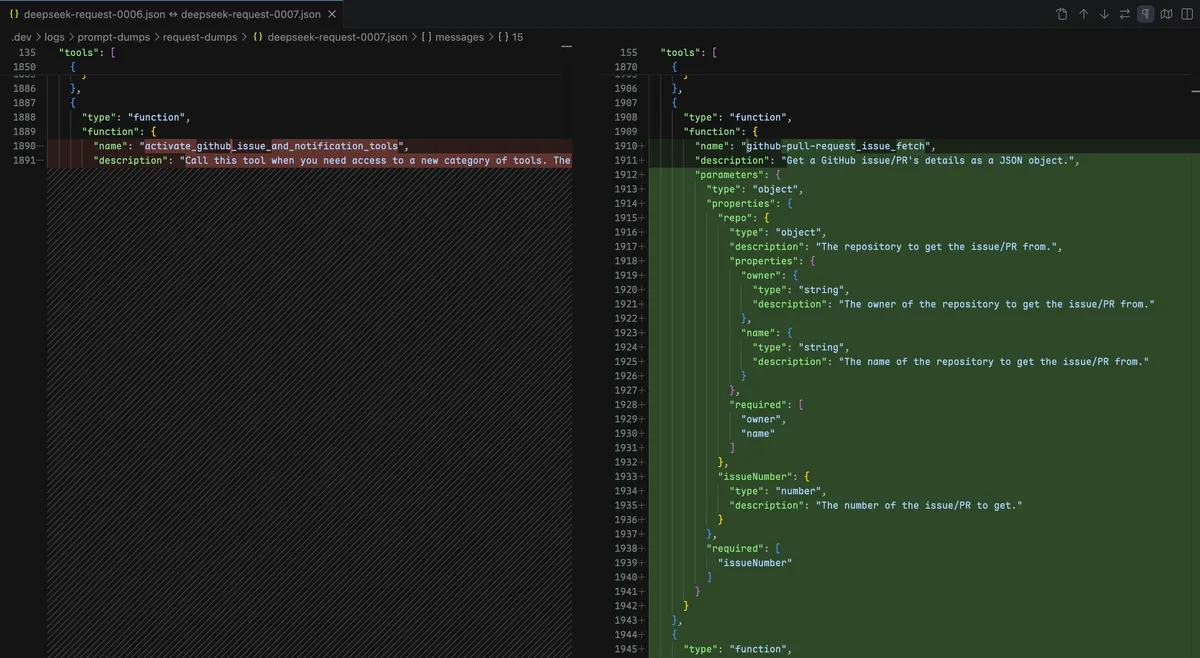
The key data structure (from Copilot Chat's virtualTool.ts):
class VirtualTool {
  public isExpanded = false;  // starts collapsed

  public *tools() {
    if (!this.isExpanded) {
      yield { name: this.name, ... };  // just the placeholder
      return;
    }
    for (const content of this.contents) {
      yield* content instanceof VirtualTool ? content.tools() : [content];
    }
  }
}
How Expansion Happens
The first time the model calls one of these activate_* tools, Copilot Chat's toolGrouping.ts sets isExpanded = true. The placeholder is permanently replaced by the real tools for the rest of the session:
Turn N:   tools = [..., activate_github_issue, ...]     ← 1 placeholder
          Model calls activate_github_issue
          → isExpanded = true

Turn N+1: tools = [..., issue_fetch, labels_fetch, ...]  ← 3 real tools
          ↑ cache misses from this position onward
This isn't a bug; it's an intentional design to keep the initial tool list smaller. But because tools sit before messages in the cache prefix, every expansion destroys the cache for everything after the changed position.
Cache Impact
Here's what a real expansion looked like in my testing (Agent mode, 93 tools, 16 messages):
tools:  93  →  95  (+2)

Position 60:
  Before: activate_github_issue_and_notification_tools
  After:  github-pull-request_issue_fetch
          github-pull-request_labels_fetch
github-pull-request_notification_fetch| Turn | Cache Hit | Cache Miss | Hit Rate | Event |
|---|---|---|---|---|
| #6 | 41,856 | 109 | 100% | Before expansion |
| #7 | 15,616 | 26,591 | 37% | ← activate_* expanded at position 60 |
| #8 | — | — | 100% | Recovered next turn |
The 15,616 tokens that survived are tools[0..59], the unchanged portion of the tool list. Everything from position 60 onward (remaining tools + all 16 messages) is a cache miss.
Multiple Expansions Compound
In a single conversation, I observed two independent expansions:
| Expansion | Tools Change | Position | Hit Rate Drop | Recovers |
|---|---|---|---|---|
| PR tools group | 91 → 93 | index 57 | 99% → 17% | Next turn |
| Issue tools group | 93 → 95 | index 60 | 100% → 37% | Next turn |
The expansion position determines the damage. A group at index 57 leaves only tools[0..56] cacheable (17%); at index 60 leaves tools[0..59] (37%). Each expansion is a one-time hit; the next turn recovers fully.
Is There a Way Around It?
The grouping threshold (START_GROUPING_AFTER_TOOL_COUNT = 64) is a hardcoded constant in Copilot Chat. The user-facing setting github.copilot.chat.virtualTools.threshold only controls re-collapsing after compaction, not whether groups are created. In Agent mode with any extensions installed, you'll always exceed 64 tools and always have activate_* groups.
One obvious idea: keep the total tool count under 64 so that activate_* grouping never kicks in. This would require disabling extensions or MCP servers that contribute tools, which is practical for some users but not for others.
Could we do something at the provider layer? We receive the full tools array from Copilot Chat on each request. In theory, we could eagerly "call" all activate_* tools ourselves in the first request to force expansion upfront, collapsing all future expansions into a single cache miss. But we don't control the VirtualTool lifecycle; the isExpanded flag lives inside Copilot Chat's ToolGrouping instance. Even if we sent back synthetic tool results claiming activation, there's no guarantee Copilot Chat would honor them for cache purposes.
This remains an open question: is there a clean way to stabilize the tools array from outside Copilot Chat's process boundary?
5. Mechanism #2: The System Message Is Reassembled Every Turn
The system message, messages[0], is not a static string. It's assembled fresh on every request by Copilot Chat's AgentPrompt.render() (from agentPrompt.tsx). The assembly involves multiple layered components, each with different stability guarantees:
messages[0] =
  ┌─ A: Identity + Safety Rules ──────┐  ★★★  Always stable
  ├─ B: Core Agent Instructions ──────┤  ★☆☆  Changes with tools & mode
  ├─ C: Memory Instructions ──────────┤  ★★☆  Mostly stable
  ├─ D: Custom Instructions (skills) ─┤  ★☆☆  MOST UNSTABLE; disappears during steering
  ├─ E: Mode Instructions ────────────┤  ★★☆  Absent by default; appears on Plan/Custom Agent switch
  ├─ F: Autopilot Instructions ───────┤  ★★☆  Absent by default; appears on Autopilot toggle
  ├─ G: Template Variables ───────────┤  ★★★  Stable within session
  └─ H: Workspace Context ────────────┘  ★★★  Cached after first render
Let's walk through each block: what it contains, whether it changes, and what triggers changes.
Block A: Identity + Safety Rules (Always Stable)
You are an expert AI programming assistant, working with a user in the VS Code editor.
When asked for your name, you must respond with "GitHub Copilot".
Follow Microsoft content policies.
Keep your answers short and impersonal.
This outer shell is hardcoded in AgentPrompt.render(). It never changes within a session. It's roughly 25,600 tokens, which is why even in the worst cache collapses you'll see ~25,600 tokens hit the cache. This block is the safe zone.
Block B: Core Agent Instructions (Changes Frequently)
This is the main instruction block, rendered by DefaultAgentPrompt (from Copilot Chat's defaultAgentInstructions.tsx). It contains conditional lines driven by detectToolCapabilities():
[When edit tools are available:]
  NEVER print out a codeblock with file changes... use the appropriate edit tool.

[When no edit tools:]
  You don't currently have any tools available for editing files.

[When terminal tool is available:]
  Don't call the run_in_terminal tool multiple times...

[When no terminal tool:]
  You don't currently have any tools available for running terminal commands.
What triggers changes in Block B:
| Trigger | What Changes | Example |
|---|---|---|
| Mode switching (Ask → Agent) | Tool availability changes → many conditional lines flip | "don't have tools for editing" → "NEVER print codeblock" |
activate_* expansion | New tools appear → detectToolCapabilities() output changes | Minor wording shifts in tool-use instructions |
codesearchMode flag | Entire code-search instruction block appears/disappears | Ask mode: extra exploration instructions |
Block C: Memory Instructions (Mostly Stable)
Rendered by Copilot Chat's memory system. Within a session, this stays constant. It can vary between sessions if A/B experiment flags change, but this is rare.
Block D: Custom Instructions / Skills Index (The Most Volatile Block)
This is the 13KB block containing all your skill definitions and agent configurations:
<instructions>
<skills>
  <skill>
    <name>suggest-fix-issue</name>
    <description>Given the details of an issue, suggests a fix for the issue.</description>
    <file>/Users/Vizards/.vscode/extensions/github.vscode-pull-request-github-0.142.0/src/lm/skills/suggest-fix-issue/SKILL.md</file>
  </skill>
  ... (N+ skill definitions)
</skills>
<agents>
  Here is a list of agents that can be used when running a subagent.
  Each agent has optionally a description with the agent's purpose and expertise. When asked to run a subagent, choose the most appropriate agent from this list.
  Use the 'runSubagent' tool with the agent name to run the subagent.
  <agent>
    <name>Explore</name>
    <description>Fast read-only codebase exploration and Q&A subagent. Prefer over manually chaining multiple search and file-reading operations to avoid cluttering the main conversation. Safe to call in parallel. Specify thoroughness: quick, medium, or thorough.</description>
    <argumentHint>Describe WHAT you're looking for and desired thoroughness (quick/medium/thorough)</argumentHint>
  </agent>
</agents>
</instructions>
What controls it: A variable called vscode.customizations.index. This variable is only created when Copilot Chat's computeAutomaticInstructions() finds instruction files (.instructions.md, skills, agents) to reference. If the variable is absent from the request's chatVariables, the entire block disappears, a 13,065 character, 198-line difference.
General condition for disappearance: The vscode.customizations.index variable is absent from chatVariables. This is the only condition. Block D doesn't have its own toggle; it's purely driven by whether Copilot Chat decided to include the variable. Terminal steering (Trigger B) is simply the most frequently encountered scenario where this happens, because steering requests carry attachedContext without instruction file references. Any other request type that similarly lacks these references would have the same effect.
Block E: Mode Instructions (Appears on Plan/Custom Agent Switch)
Only appears when you're using Plan mode or a Custom Agent. Switching to one of these modes mid-session injects a <modeInstructions> block containing the agent's workflow definition (from .agent.md or the built-in Plan agent provider). This changes messages[0] and causes a one-time cache miss, similar in magnitude to Ask↔Agent switching but rarer in practice.
Block F: Autopilot Instructions (Appears on Autopilot Toggle)
Only appears when VS Code's Permission Mode is set to "Autopilot (Preview)". Toggling this mid-session injects a task_complete instruction into the system message and adds the task_complete tool to the tools array, hitting both Mechanism #1 and #2 simultaneously. Like other mode changes, it's a one-time cache rebuild.
Block G: Template Variables (Stable Within Session)
VSCODE_USER_PROMPTS_FOLDER: /Users/.../User/prompts
VSCODE_TARGET_SESSION_LOG: /Users/.../session-log
Same session ID → same content. Changes only across sessions, but since it sits at the very end of messages[0], it doesn't affect the prefix.
Block H: Workspace Context (Cached After First Render)
Generated once at session start, then cached in Copilot Chat's turn metadata. Stable.
Now let's look at the major triggers that cause these blocks to change, and what the cache impact looks like for each.
Trigger A: Mode Switching (Ask ↔ Agent)
Severity: 🟢 Expected (one-time cost, predictable)
Which blocks change: Blocks B1, B2 (tool availability flips between 23 and 92 tools), plus the codesearchMode instruction block appears/disappears. Tools also change from 23 → 92.
Cache impact:
| Turn | Messages | Tools | Hit Rate | Mode |
|---|---|---|---|---|
| #4 | 12 | 23 | 99% | Ask |
| #5 | 14 | 92 | 41% | ← Switched to Agent |
| #6 | 16 | 92 | 98% | Agent (recovered) |
The ~25,600 tokens that survive the switch are Block A (the stable identity shell). Everything else (Block B instructions, the entire tools array, and all conversation history) is rebuilt. But it recovers completely on the next turn.
Trigger B: Terminal Steering (The Silent Cache Killer)
Severity: 🔴 Critical in long conversations
This is the most impactful trigger because it happens automatically; you don't need to do anything special.
Which blocks change: Only Block D (skills index), which disappears entirely because the steering request's attachedContext lacks instruction file references. The system message shrinks by ~13,000 characters and 198 lines:
![Terminal Steering changed message[0]](/images/message-0-change.webp)
messages[0]:  25,178 chars  →  12,113 chars  (-13,065 chars, -198 lines)

Removed:
  <instructions>
  <skills>...(50+ skill definitions)...</skills>
  <agents>...(agent definitions)...</agents>
  </instructions>
Blocks A, B, C, G, H remain identical. Tools do not change.
How to reproduce:
In Agent mode, run any command that produces terminal output:
Please run a terminal command that waits for user input.

Command:
node -e "process.stdout.write('Continue? [Y/n] '); process.stdin.resume();"
When the terminal produces output, Copilot Chat fires a "terminal steering" request to check if the terminal state needs attention.
Why it happens (root cause from source):
Steering requests go through the exact same prompt construction pipeline as normal requests. The difference is in what they carry. Tracing through the VS Code and Copilot Chat source:
- Every chat request runs
computeAutomaticInstructions()(VS Code'schatServiceImpl.ts) to build thechatVariablesset. - Inside that,
_getCustomizationsIndex()reads the request'sinstructionFilesreferences (.instructions.mdfiles, skills, agents) and assembles them into aPromptVariablewith IDvscode.customizations.index. - If
instructionFilesis empty (no references to enumerate),_getCustomizationsIndex()returnsundefined, and the variable is never added tochatVariables. - Later,
AgentPrompt.render()callsgetAgentCustomInstructions()→CustomInstructions.render(), which iterateschatVariableslooking forvscode.customizations.index. Not found → Block D is not rendered.
Steering requests carry attachedContext that only contains terminal output text, with no instruction file references. So step 2 yields nothing, and the chain ends there. But this mechanism is general: any request whose attachedContext lacks instruction file references will lose Block D. Terminal steering is just the most common case.
When does terminal steering trigger?
| Terminal State | Steering? |
|---|---|
| Command running (stdout streaming) | ✅ Yes |
| Command running (stderr streaming) | ✅ Yes |
| Command waiting for user input | ✅ Yes |
| Background task with output | ✅ Yes |
| Long output (>buffer) | ✅ Yes (potentially multiple times) |
| Command exited normally | ❌ No |
Consecutive steering requests are debounced into one. But one is enough.
Cache impact in short conversations (~36K tokens, 6 messages):
| Turn | Cache Hit | Cache Miss | Hit Rate | Event |
|---|---|---|---|---|
| #3 | 35,968 | 406 | 99% | Normal |
| #4 | 28,928 | 3,504 | 89% | ← Terminal steering triggered |
| #5 | 32,640 | 99 | 100% | Recovered next turn |
89% is noticeable but not catastrophic; the conversation is still small.
Cache impact in long conversations (~190K tokens, 170 messages):
| Turn | Cache Hit | Cache Miss | Hit Rate | Event |
|---|---|---|---|---|
| #74 | 182,016 | 1,370 | 99% | Normal |
| #75 | 25,600 | 164,947 | 13% | ← Terminal steering triggered |
165,000 tokens of conversation history are all cache misses. Only Block A (the stable 25,600-token identity shell) survives. The next turn recovers to 99% if Copilot Chat restores the full system message with the skills index, which it normally does.
Trigger C: activate_* Expansion (Secondary System Message Effect)
Severity: 🟡 Minor (primarily a tools change with a small system message side effect)
We already covered this as Mechanism #1 (tools change). But it also has a secondary effect on the system message: when new tools appear, detectToolCapabilities() re-evaluates and may flip conditional lines in Block B. This effect is small compared to the tools change itself, but it means the system message and tools change simultaneously, a double hit on the prefix.
What, if anything, we can do about this: see the discussion in Section 6.
Other Mode Changes: Plan / Custom Agent / Autopilot
Severity: 🟢 Rare (one-time cost, predictable)
The same principle applies to other mode toggles:
- Switching to Plan mode or a Custom Agent injects Block E (
modeInstructions), changingmessages[0]. The tools array may also change if the custom agent declares a restricted tool set. - Toggling Autopilot injects Block F (the
task_completeinstruction) and addstask_completeto the tools array, a double hit on both mechanisms.
These behave exactly like Ask↔Agent switching: one-time cache rebuild, recovers on the next turn. They're listed separately from Trigger A mainly because they're triggered by different user actions, but the underlying mechanism is identical: system message and/or tools change, prefix breaks, cache rebuilds.
6. Open Questions
Stabilizing the Tools Array
The activate_* virtual tool mechanism is the deeper of the two problems because we have no visibility into Copilot Chat's ToolGrouping state. The only knob visible to us is the total tool count: if it stays under 64, grouping never activates. This means disabling extensions or MCP servers that push the count over the threshold, which is practical for some users but not for others.
Could the provider layer do more? One idea: if we could detect which activate_* groups exist and pre-expand them by sending synthetic tool calls in the first request, we'd trade N incremental cache misses for one upfront miss. But we don't control the isExpanded flag, and there's no API to force expansion from outside.
Another direction: could we normalize the tools array ourselves? If we know a group will expand to a predictable set of tools, we could replace the activate_* placeholder with the expanded tools in our provider before sending to DeepSeek, making the prefix stable across expansions. But this requires predicting Copilot Chat's grouping logic, which is version-dependent and fragile.
Stabilizing the System Message
If the system message is the source of so much cache instability, could we just… replace it?
The most aggressive approach would be to intercept messages[0] in our provider and substitute a fixed, pre-computed system prompt. This would make the prefix perfectly stable, eliminating cache drops from mode switches, steering requests, and tool capability changes.
But this comes at a steep cost. The system message isn't just boilerplate; it carries functional instructions that enable Copilot features:
- Ask Mode vs Agent Mode: Different instructions tell the model whether it can edit files, run terminals, or use browsers. Replacing these with a static message would break mode-specific behavior.
- Plan Mode & Custom Agents: These inject
modeInstructions(Block E) with user-defined workflows. A fixed system message would lose these entirely. - Autopilot Mode: The
task_completetool instruction (Block F) would be lost. - Tool availability instructions: The conditional "you have / don't have these tools" lines (Block B) help the model understand its capabilities. A static message might claim tools exist that don't, or vice versa.
- Skills & Agents index (Block D): Without this, the model wouldn't know about your installed skills. (Terminal steering already strips this block, so we're already losing it sometimes.)
A more nuanced approach: instead of replacing the entire messages[0], we could selectively stabilize the volatile blocks. For example:
- Block D (skills index): Cache it on first render and replay it, ignoring Copilot Chat's occasional omission during steering.
- Block B (core instructions): Accept minor fluctuations but normalize the most variable parts (like tool capability checks).
- Blocks A, C, G, H: Already stable; no action needed.
The challenge is that we receive messages[0] as an opaque blob from Copilot Chat. We'd need to parse it, identify block boundaries, and selectively replace sections. All of this is fragile and version-dependent. And any mistake could silently break Copilot functionality.
Some other directions worth exploring:
- Diff-based patching: Instead of full replacement, compute the minimal diff needed to keep the prefix stable while preserving new functional instructions from Copilot Chat.
- Upstream conversation: The most robust fix would be at the Copilot Chat level: making the prompt assembly aware of prefix caching. For example, always including
vscode.customizations.indexin steering requests, or eagerly expanding allactivate_*groups at session start to avoid mid-session changes.
Each of these has different complexity/benefit trade-offs. None has been implemented yet; they're open problems worth exploring.
Other Sources of Cache Misses
This post focused on the two mechanisms that cause cache misses within a single session. There are additional sources worth noting, each at a different stage of resolution:
- Vision description drift (fixed): The vision proxy may describe the same image slightly differently on different turns, changing historical image messages. This has been addressed by caching the first description and replaying it on subsequent turns.
- Session restart (Reload Window) (fixable): Reasoning cache and vision description cache are currently in-memory and wiped on reload, causing catastrophic first-request cache misses. This could be mitigated by persisting these caches to disk. Straightforward in principle, but not yet implemented.
- Compaction / summarization (by design): Copilot Chat periodically replaces old messages with summaries when the context window fills up. This destroys the history prefix, but there's no good reason to interfere. Context compression is Copilot Chat's legitimate memory management mechanism. If the history is being summarized, it means the conversation has grown large enough that some cache loss is the expected trade-off for staying within the context window.
7. Observations
Only two things can change between requests: the
toolsarray or the system message (messages[0]). Every cache miss scenario I've observed is a combination of these two.Tools sit before messages in DeepSeek's cache prefix. This means any tool change invalidates the cache for the entire conversation history, not just the tools themselves. This was confirmed via controlled experiment.
The system message has 8 layered blocks with varying stability. Block A (identity shell) is the only truly stable block: it never changes within a session and anchors ~25,600 tokens of cache. Blocks B and D are the most frequently volatile; Blocks E and F can appear on mode/autopilot switches; C, G, H are mostly or fully stable.
Terminal steering is the most damaging trigger observed. It fires automatically whenever your Agent runs a command with output, silently strips 13KB from the system message, and in long conversations drops hit rates from 99% to 13%.
activate_*expansions are one-time hits per tool group. They recover on the next turn, but each new tool domain you explore triggers another expansion.You can monitor your cache health. The extension's output channel logs cache hit rates for every request. Look for sudden drops and correlate them with terminal commands or first-time tool usage.
8. Scope, Limitations & Feedback
This analysis is based on deepseek-v4-for-copilot v0.4.1 and Copilot Chat at commit 9e668cb.
Known limitations of this analysis:
- Only applies to Agent mode (Ask mode not tested)
- Copilot Chat updates may change behavior
- DeepSeek API behavior may differ
Feedback: